Free quizIs My Child Ready to Code?Take the Free Quiz →
ON SALE NOW · 100 MUST-KNOW TECH WORDS

Speak the language of the future.

Start with the 100 Must-Know Tech Words, from binary to AI, as printable flashcards and a web app your whole family will actually use. Then build real things, seven days at a time.

  • 100must-know words
  • 7topic parts
  • 2languages
  • 4age tiers
~/7daytech/must-know-words

$ learn --word next --lang en

#17

Loop

Part 2 · Coding

Code that repeats a set of instructions, either a set number of times or until something becomes true.

status: learned ✓27/100
flashcardsquiz ★★★progressEnglish · Taglish
Free 2-minute quiz

Is My Child Ready to Code? or: Am I Ready to Code?

7 quick questions, for your child or for yourself. Get the right starting level, strengths, and a first project matched to what they love.

Take the Free Quiz →

01 · The bundle

Make 100 must-know tech words stick.

Turn the 100 Must-Know Tech Terms into a game your child will love to play, on paper and on screen. All ages, English and Taglish.
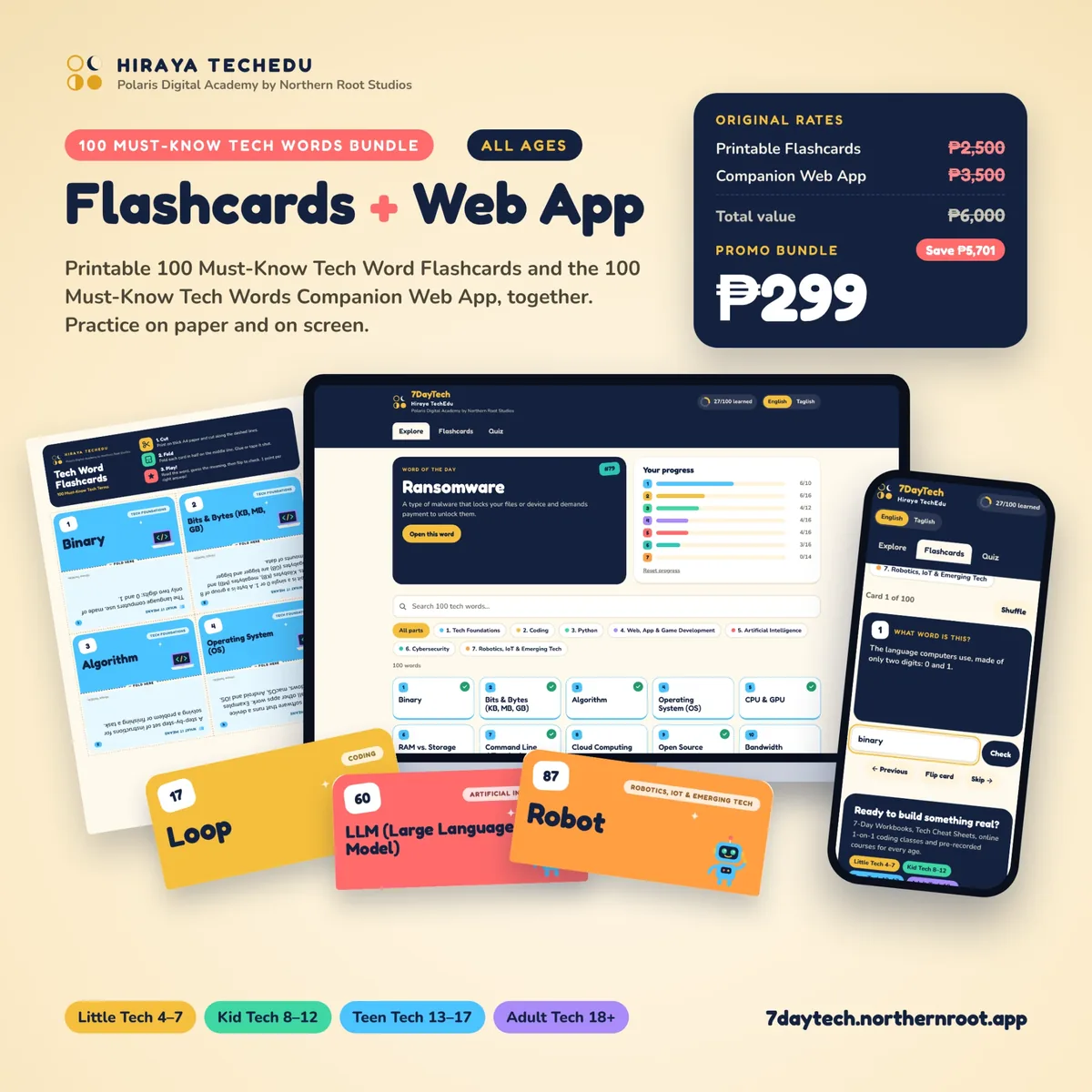
The 100 Must-Know Tech Words Bundle: flashcards plus web app. Original rates: Printable Flashcards ₱2,500, Companion Web App ₱3,500, total value ₱6,000. Promo bundle ₱299, save ₱5,701. All ages.
100 Must-Know Tech Words Bundle
  • Printable 100 Must-Know Tech Word FlashcardsEnglish + Taglish, plus game rulesValue ₱2,500
  • 100 Must-Know Tech Words Companion Web AppFlashcards, quiz and progress trackerValue ₱3,500
Total value₱6,000
Bundle promo price
₱299

Paid in US dollars through PayPal, with your PayPal account or a card.

Flashcards ₱2,500 + Web App ₱3,500. You save ₱5,701.

  • Sent the moment you pay: PDFs + your web app link
  • GCash, QR Ph, card, Maya, GrabPay or PayPal
  • Digital only: nothing is printed or shipped

All 100 words · 7 subjects

From binary to AI, in 7 subjects.

The same 100 words on the flashcards and in the web app, grouped the way the free ebook teaches them.
Part 1 · Words 1–10Tech FoundationsBinary · Algorithm · CPU & GPU · Cloud
Part 2 · Words 11–26CodingVariable · Loop · Function · Debugging · GitHub
Part 3 · Words 27–38Pythonprint() · input() · Loops · Libraries & pip
Part 4 · Words 39–54Web, App & Game DevelopmentHTML · CSS · JavaScript · API · Game Engine
Part 5 · Words 55–70Artificial IntelligenceMachine Learning · LLM · Prompt Engineering · Deepfake
Part 6 · Words 71–86Cybersecurity2FA · OTP · Phishing · Malware · Digital Footprint
Part 7 · Words 87–100Robotics, IoT & Emerging TechSensor · Arduino · Raspberry Pi · Drone · 3D Printing
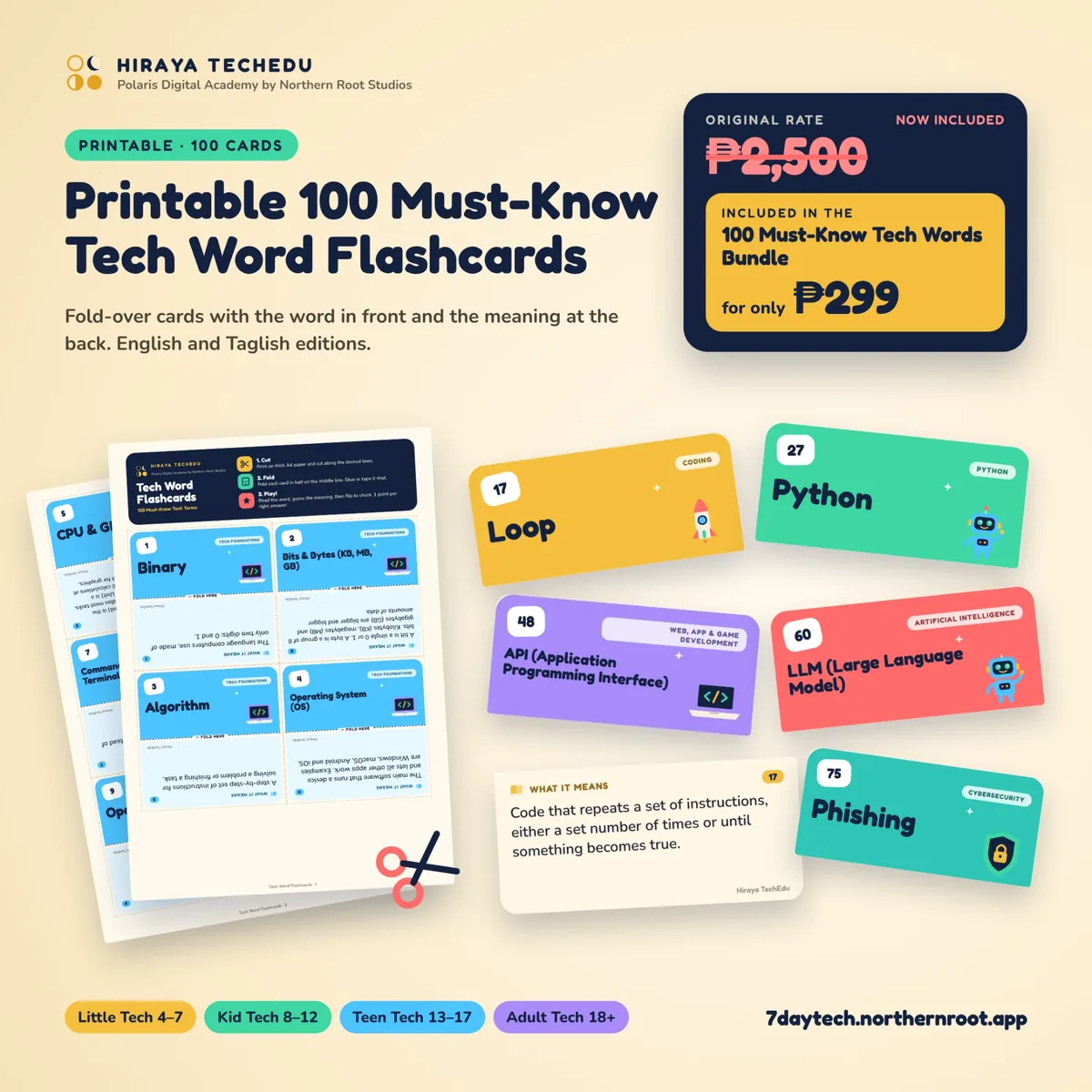
Printable 100 Must-Know Tech Word Flashcards: fold-over cards with the word in front and the meaning at the back
Part 1 · Printable

Printable 100 Must-Know Tech Word Flashcards

Value ₱2,500 · included in the ₱299 bundle

Print, cut and fold. Read the word, guess the meaning, then flip to check. One point per right answer.

  • 100 fold-over cards: word in front, meaning at the back
  • Color-coded by topic, big kid-friendly fonts
  • English and Taglish editions, plus game rules
  • Print at home on thick A4 paper
100 Must-Know Tech Words Companion Web App on a laptop and phones: explore, flashcards and quiz, in English and Taglish
Part 2 · Web app

100 Must-Know Tech Words Companion Web App

Value ₱3,500 · included in the ₱299 bundle

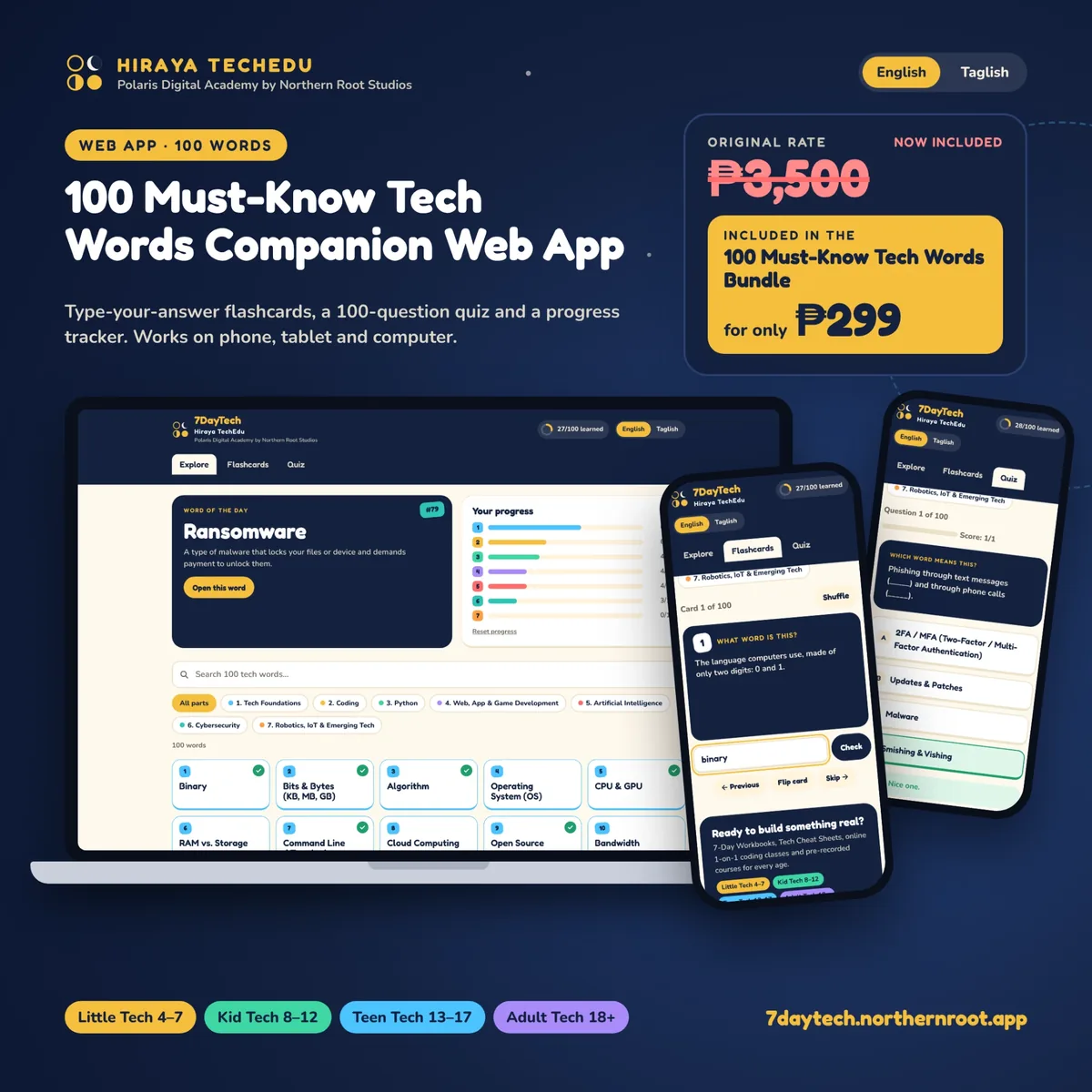
The same 100 words on screen, for the car, the waiting room or ten minutes before bed. Nothing to install.

  • Type-your-answer flashcards for all 100 words
  • 100-question quiz with stars and scores
  • Progress tracker and a word of the day
  • Works on phone, tablet and computer, in English or Taglish

Words that stick

Guess first, then check: the way memory works best.

Paper and screen

Cards for family time, the app for on the go.

See real progress

Know which words your child has learned.

10 minutes a day

Short, fun rounds for busy school days.

Little Tech 4–7Kid Tech 8–12Teen Tech 13–17Adult Tech 18+

Flashcards ₱2,500 + Web App ₱3,500: total ₱6,000. Yours for ₱299, you save ₱5,701.

02 · The waitlist

Be first when the workbooks ship.

The workbooks have no price yet, and joining costs nothing. Leave your email and we will write to you when the first 7DayTech workbook is out.

  • Hear first, before anyone else
  • Pick the titles you want most: we build those sooner
  • One click to leave, in every email

Join the 7DayTech waitlist

Which age group is this for? (required)

Under 18? Ask a parent or guardian to sign up for you. We keep your email only for this list. Privacy

03 · Every age

Little Tech. Kid Tech. Teen Tech. Adult Tech.

The same subjects, written again for each age, so a four-year-old and a parent can learn side by side.

Little TechAges 4–7

Big ideas through play, pictures and unplugged activities.

Kid TechAges 7–12

Real projects, one small step a day.

Teen TechAges 13–17

Real tools and projects worth showing friends.

Adult Tech18 and up

Straight to the skill, no talking down.

04 · Coming to the Tech shelf

29 workbooks in the build queue.

These are still being written, so none are for sale yet, and some titles may change. Tell us which ones you want first on the waitlist below, and we will build those sooner.

The core five

Every tier: Little Tech, Kid Tech, Teen Tech and Adult Tech.

Workbook

Coder

Your first programs: telling a computer exactly what to do.

Coming soon
Workbook

App Builder

Design and build a working app.

Coming soon
Workbook

Game Maker

Make a game you can play and share.

Coming soon
Workbook

Website Builder

Build and put up your own website.

Coming soon
Workbook

AI Explorer

What AI is, how to use it well and safely, and how it works.

Coming soon

For Little Tech and Teen Tech

Robot Builder · Little and TeenPython · Little and TeenCyberSafe · Little and Teen

More workbooks

Every tier, unless noted.

3D Game CreatorVideo CreatorAI Chatbot BuilderDrone CoderBeat Coder3D DesignerAnimatorMath Game CoderCircuit ExplorerTech PresenterData DetectivePixel ArtistTyping HeroSmart Home InventorUnplugged Coder · Little, Teen and Adult

Cheat sheets, hackathons and tools

Also coming

Kid Coder Cheat Sheets

30+ volumes in 4 levels: Little Kid Coder (4–7), Kids (7–12), Beginner Teens and Beginner Adults.

Coming soon
Also coming

Little Hackers

Hackathon modules with workbooks and materials, ages 5–7.

Coming soon
Also coming

Junior Hack

Hackathon modules, ages 8–12.

Coming soon
Also coming

Teen Hack

Hackathon modules, ages 13–17.

Coming soon
Also coming

Adult Beginner Hack

Hackathon modules, 18 and up.

Coming soon
Also coming

Hiraya Companion App

Day 1–7 missions, badges, a certificate and a parent dashboard.

Coming soon

05 · How a 7-Day book works

Seven days. One finished thing.

Every 7-Day program from Polaris Digital Academy is built the same way: short daily steps you actually do, not a textbook you read.

1

One small step a day

Ten to twenty-five minutes. One idea, explained plainly, then straight into doing it.

2

Do it, don't just read it

Every day ends with something you made, wrote, built or decided, in the workbook itself.

7

Something real on day seven

Each book ends with a finished result you can show someone. Cheat sheets keep the key pages at hand afterwards.

Who it's for

Parents of curious kids

A week of making instead of scrolling, with a finished thing to show on day seven.

Teens who want to build

Apps, games and websites, explained plainly and built for real.

Adults starting from zero

Coding and AI without the jargon, one small step a day.

06 · Before you ask

Questions

What is in the 100 Must-Know Tech Words Bundle?

Two things. Printable 100 Must-Know Tech Word Flashcards: 100 fold-over cards with the word in front and the meaning at the back, color-coded by topic, in English and Taglish editions, plus game rules. And the 100 Must-Know Tech Words Companion Web App: type-your-answer flashcards for all 100 words, a 100-question quiz with stars and scores, and a progress tracker. The words are the same 100 as in our free ebook, 100 Must-Know Tech Terms.

How do I get it after I pay?

Straight away, on this page and by email. You get a download link for the flashcard PDFs and a private link to the web app. The download link works for 30 days, so save the PDFs to your phone or computer. The web app link is yours to keep: bookmark it or add it to your home screen.

Does the web app work on a phone?

Yes, on any phone, tablet or computer with a web browser. Nothing to install. Progress is saved on each device, so use the same device to keep your child's progress in one place.

I lost my links. What now?

Press "Already bought? Get your links again" in the shop above and enter the email address you paid with. We send your links to that address.

When will the workbooks be ready?

When each one is finished and tested. We would rather not give a date we cannot keep, so the waitlist is how you hear first.

How much will the workbooks cost?

Workbook prices are not set yet. Nothing is charged for joining the waitlist, and you are never signed up to pay for anything.

What format will the workbooks be?

Printable PDF workbooks, like 7-Day Musician, with cheat sheets for the key pages. You can print them or fill them in on a tablet. Everything is digital: downloadable PDFs and access codes sent to your email. Nothing is printed or shipped as a hard copy.

Can my child do this alone?

The Little and Kids tiers are meant for a child with a grown-up nearby. Teen and Adult are for working alone.

Do we need a computer?

Most workbooks need a computer or tablet. Unplugged Coder starts with no screen at all.

Can I leave the waitlist?

Yes. Every email has an unsubscribe link, or use the unsubscribe page on this site.

Explore the 7-Day Family